
Ask your company's documents a question, get a cited answer — without the data leaving your control
EKAP is a self-hosted AI knowledge assistant that turns scattered internal documents into a natural-language Q&A tool, with every answer citing its source. It runs entirely on your own infrastructure and respects your existing access permissions.
Your knowledge is scattered, and search doesn't cut it
PDFs, wikis, spreadsheets, Confluence pages — the answer is in there somewhere, but finding it means asking around or digging through folders. Meanwhile, off-the-shelf AI tools mean sending your internal documents to a third party.
How EKAP works
Upload your documents
PDF, Word, Excel, PowerPoint, CSV, HTML, Markdown, text, scanned images, and Confluence or wiki pages exported as HTML. EKAP's hybrid retrieval engine handles everything from quick facts to 300+ page manuals.
Ask a question in plain language
EKAP finds the relevant material and answers like a knowledgeable colleague would.
Get an answer with a citation
Every response links back to the exact document, section and page, so you can verify it.
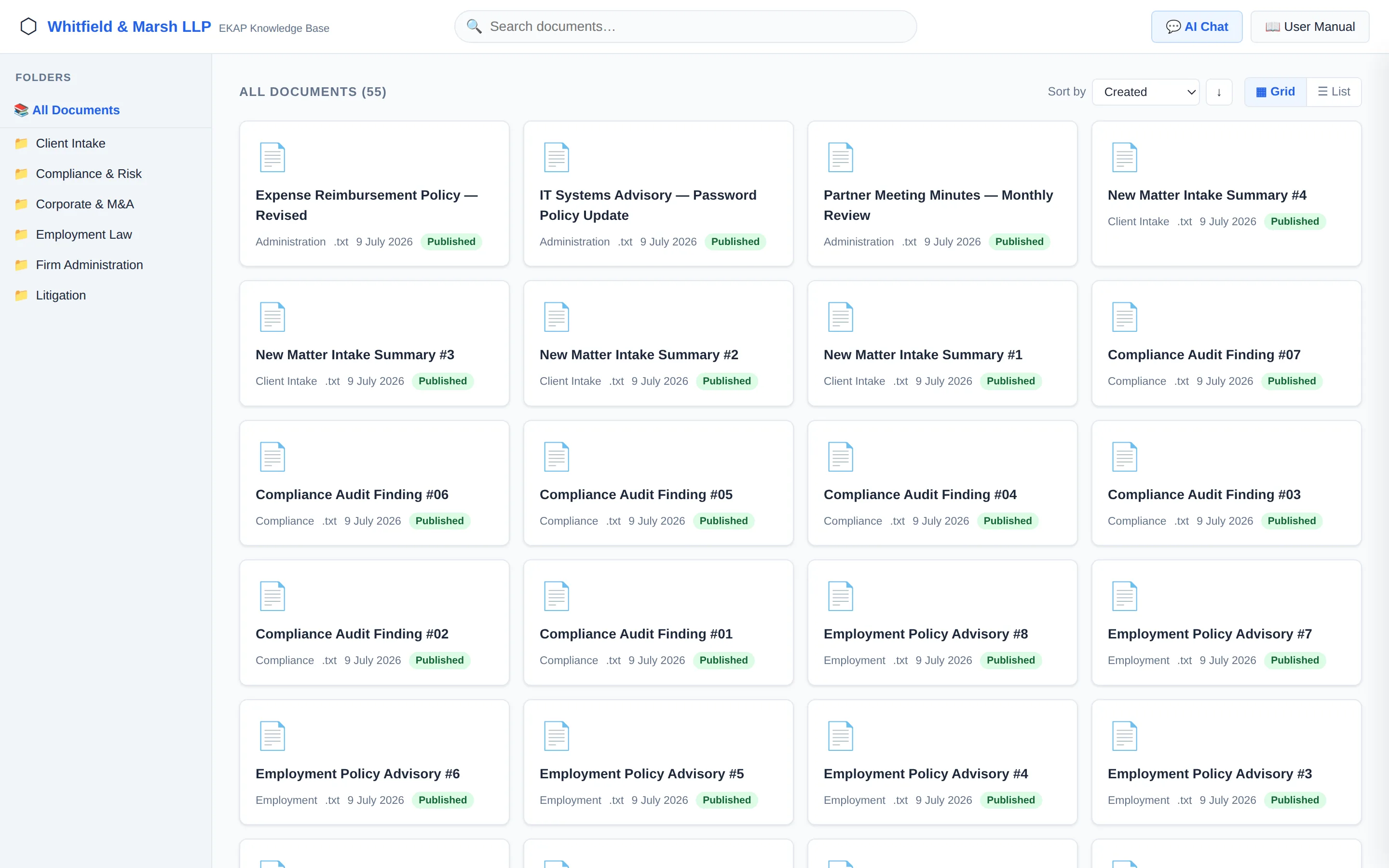
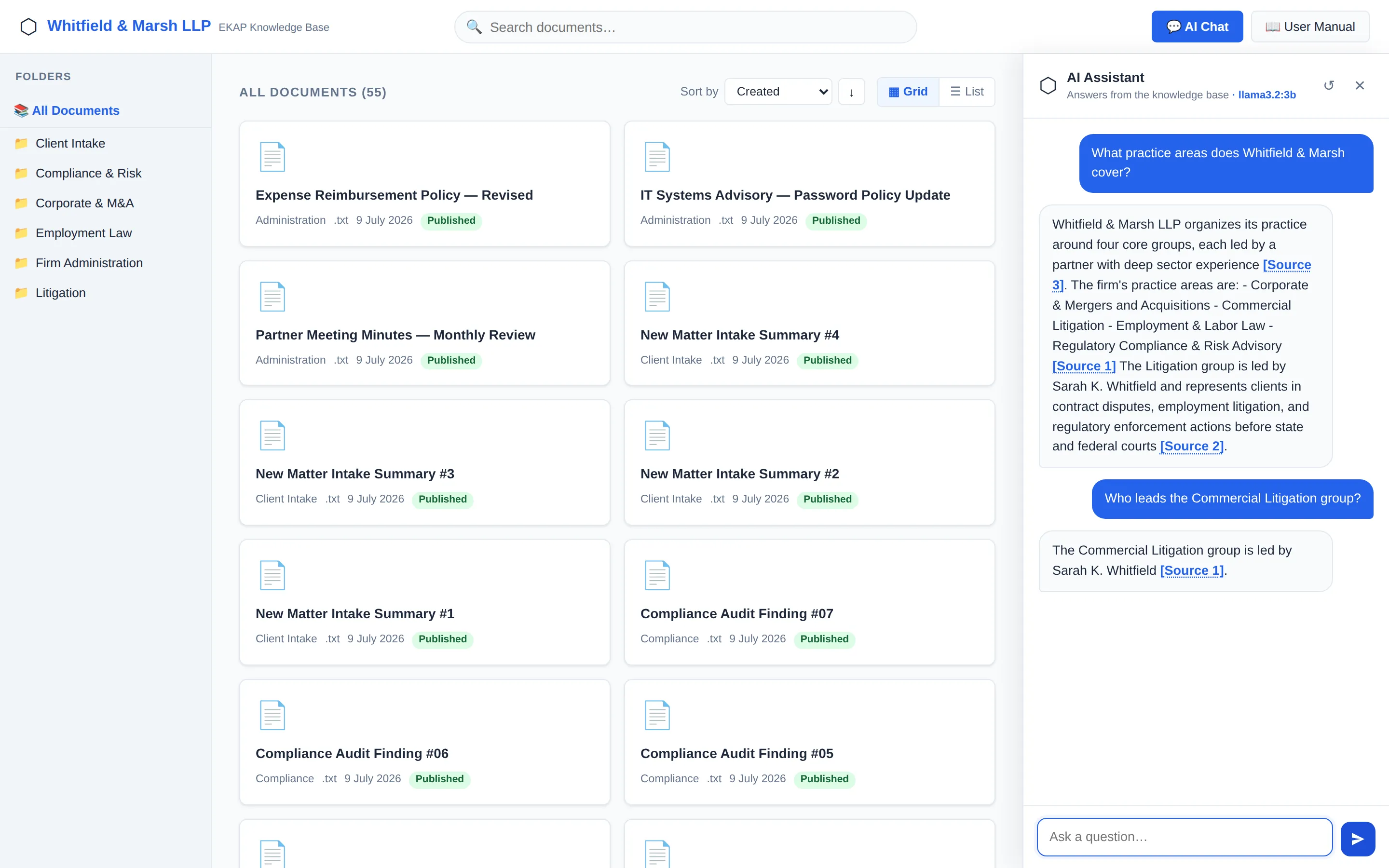
- Question Asked by a signed-in staff member (SSO, LDAP or AD)
- Permission check Narrows the search to documents this person is cleared for
- Hybrid search Semantic and keyword search across the permitted documents only
- Local AI model Writes the answer from the passages found
- Cited answer Linked to the source document and page, so you can check it
What's included
- Permission-aware answers: access is checked before any document is retrieved, so staff only ever see content they're cleared for.
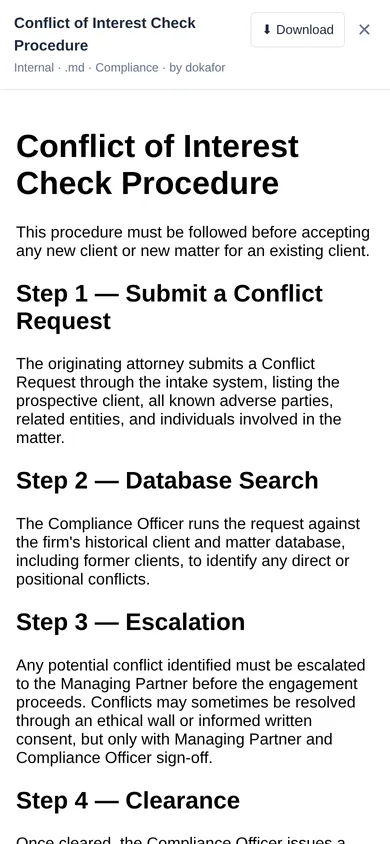
- Cited answers: every answer links to its source document and page. Click a citation to open the document right there.
- Single sign-on: LDAP, Active Directory, OAuth2/OIDC and multi-factor authentication.
- Document classification: Public, Internal, Confidential and Restricted levels, with role-based access.
- Hybrid search: combines semantic and keyword search to handle everything from quick facts to 300+ page manuals.
- OCR: scanned PDFs and images become searchable.
- Owner approval workflow: document changes go to the document owner for approval before they take effect.
- Full audit trail: every query and admin action is logged, with date-range export.
- Nested folders, trash and restore for organising the knowledge base.
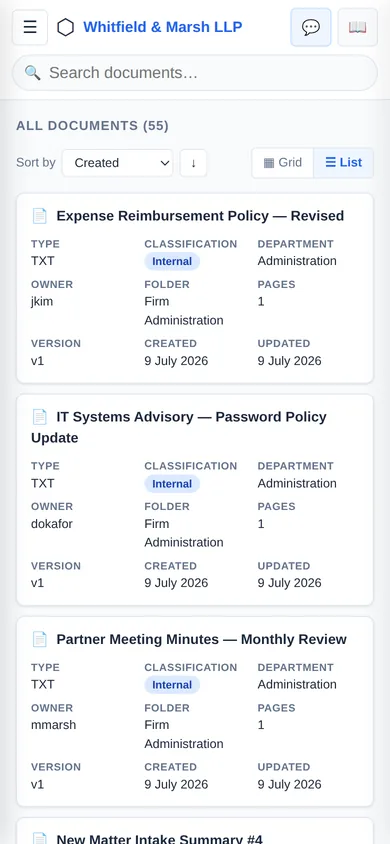
- Browse your way: staff can switch between a card grid and a detailed list view, and sort by title, type, classification, department, owner, folder, pages, version or date.
- Works on any device: the employee knowledge base and the admin portal both work on phones and tablets, including the AI chat and document previews.
- Your branding: your organisation's name across the employee knowledge base and admin portal.
- Optional external AI providers, gated by document classification level.
- Built-in system health dashboard: admins see questions answered, response times, failed answers and uploads, availability, and a live status light for every service, right in the admin portal with no extra tools to install.
- Works with your monitoring: standard Prometheus metrics, so IT teams can plug EKAP into the monitoring tools they already use.
- Flexible deployment: Docker Compose or Kubernetes, on your own servers with GPU acceleration.
Designed for sub-10-second responses, 500+ concurrent users and 99.5% uptime (design targets — pending independent testing). EKAP's admin dashboard tracks response time and availability against these targets, so you can see how your installation performs.
Browse your way
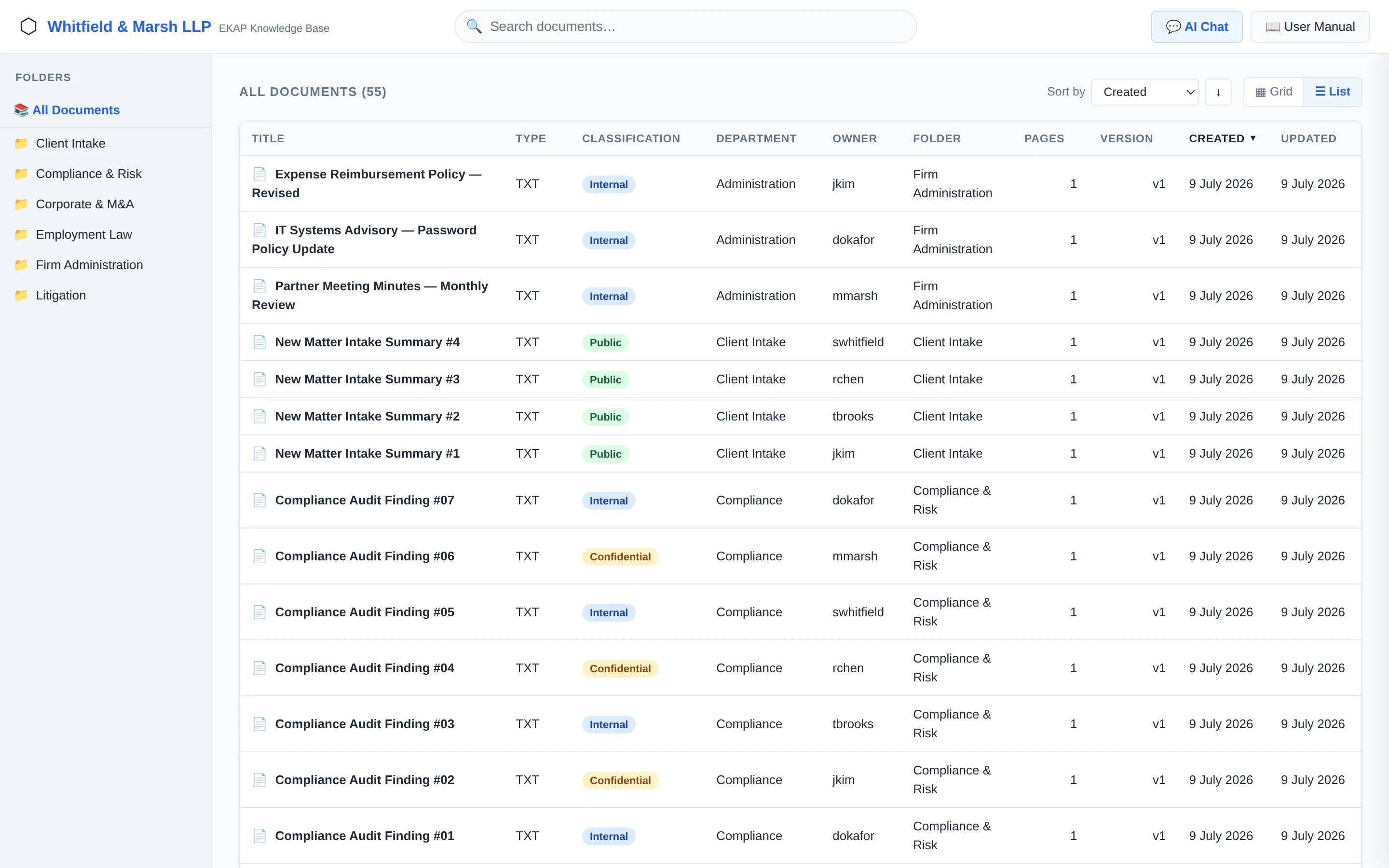
Works on any device
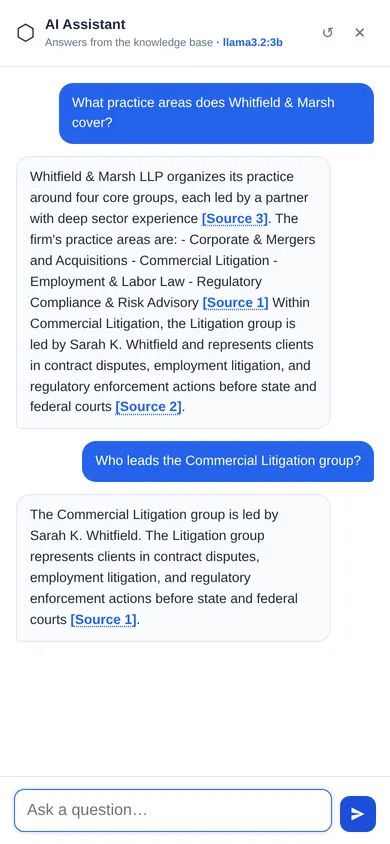
Screenshots show EKAP with demo data.
Your data stays under your control
EKAP is 100% self-hosted, running entirely on your own infrastructure. Your documents, questions and answers never leave your network unless you choose to enable an external AI provider. Every answer is filtered through your existing identity system (LDAP, AD, SSO, MFA) — permission checks happen before retrieval, not after, so people only ever see content they're authorised to see.
External AI providers are optional and can be gated by document classification when you choose to use them; EKAP doesn't require sending data to a third party by default.
Deployment and support options
EKAP runs on your own infrastructure. Get in touch to discuss deployment options and support packages for your environment.
Who it's for
IT leads and operations directors at mid-size and larger organisations with internal documents spread across multiple systems, who need staff to get fast answers without giving up control of sensitive data.
Frequently asked questions
Does our data ever leave our infrastructure?
By default, no. EKAP is self-hosted and runs entirely on open-weight AI models on your own servers. Administrators can optionally enable an external AI provider, and EKAP restricts it to documents at approved classification levels.
How does access control work?
Every answer is checked against your existing identity system (LDAP, AD, SSO, MFA) before retrieval, so users only see what they're already permitted to see.
What document types can EKAP read?
PDF, Word, Excel, PowerPoint, CSV, HTML, Markdown, text and scanned images, plus Confluence or wiki pages exported as HTML. Documents are uploaded or imported into EKAP.
How fast are responses?
EKAP is designed for sub-10-second responses — this is a design target rather than an independently verified benchmark.
How many people can use it at once?
EKAP is designed to support 500+ concurrent users — again a design target pending independent testing.
Is EKAP certified or compliant with any standard?
We don't claim ISO 27001, GDPR or SOC 2 certification. EKAP is designed to help you keep control of your own data — compliance sign-off is your organisation's responsibility.
Is EKAP open source?
No. EKAP is commercial software developed by Clyde Systems UK. It is built on well-established open-source components such as PostgreSQL, Qdrant and Keycloak, which are used in line with their licences.
Which AI models does EKAP use?
By default, EKAP runs open-weight language models (such as Meta Llama, Microsoft Phi or Qwen) locally on your own GPU hardware, so no data is sent to a third party. Other models can be configured on request.
Can we host it in our own data centre or cloud account?
Yes. EKAP is installed on infrastructure you control: on-premises servers or your own cloud account.
Do you offer support?
Yes. Every EKAP licence includes installation, updates and support from Clyde Systems UK.
How do we know it's running well?
The admin portal has a built-in System Health panel showing questions answered, response times, failed answers and uploads, availability, and the live status of every service. EKAP also exposes standard Prometheus metrics if your IT team wants to use its own monitoring tools.
Can staff use it on their phones?
Yes. The employee knowledge base, including the AI chat and document previews, works on phones and tablets, as does the admin portal.
Licensing
EKAP is commercial software licensed by Clyde Systems UK. Each licence includes installation on your infrastructure, configuration of sign-on and permissions, and ongoing updates and support. Pricing depends on your number of users and deployment size. Book a demo or get in touch for a quote.
Book a demo
A short call to see if EKAP fits how your organisation stores information.
EKAP includes third-party open-source software, used under the terms of each component's licence. Product and company names mentioned are trademarks of their respective owners.